I Built a WhatsApp Payroll Assistant: Employee Self-Service in a Chat
Employees keep asking payroll the same questions. Here is how a WhatsApp assistant answers them securely, with payslips delivered as PDFs, and what I learned about security and cost.
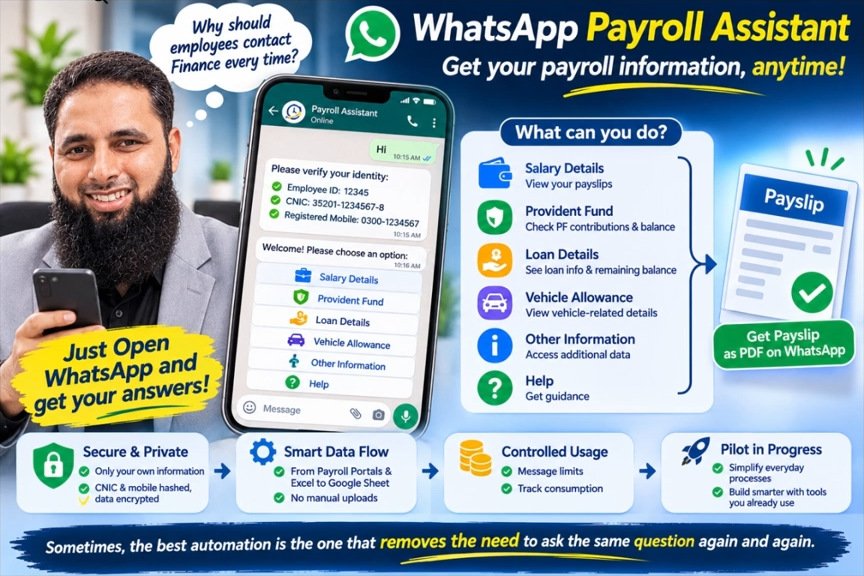
The visual I shared with the original LinkedIn post.
The same three questions, every month
What is my salary? How much provident fund do I have? What is my remaining loan balance?
Every month these questions land on the payroll team. I started wondering why employees should have to contact payroll every time. What if they could simply open WhatsApp and get the answer themselves?
So I built a WhatsApp Payroll Assistant and tested the beta version end to end.
How it works
An employee sends a simple "Hi" and verifies their identity using their Employee ID, CNIC and registered mobile number. Once verified, a simple menu appears:
- Salary details: view available payslips
- Provident fund: contributions and balance
- Loan details: loan information and remaining balance
- Vehicle allowance: vehicle-related details
- Other information and Help
The part people like most: the payslip arrives as a PDF directly on WhatsApp.
Behind the scenes, data flows automatically from the payroll portals and Excel files into a central Google Sheet, so nobody repeats manual uploads.
Two things I took seriously
Security. Employees must only see their own information. CNIC and mobile numbers are stored as hashes, and full details are encrypted.
Cost. WhatsApp messaging is not completely free. I added message limits and a usage counter to keep spending under control.
Honest status
This is currently a pilot, not a company-wide launch. It proves the idea; a wider rollout needs more testing and the right approvals.
Takeaway
Sometimes the best automation is the one that removes the need to ask the same question again and again.
I first shared this on LinkedIn. If you have a similar problem in your own team, connect with me on LinkedIn and let's talk.
Enjoyed this post?
Follow my journey from finance ledgers to one-click automation.